Configuration Manager 2012 - MDT Deployment Info to Hardware Inventory
If you are integrating MDT into ConfigMgr 2012, one of the steps it runs is Tattoo, which runs ztitatoo.wsf.
This adds some basic information about the deployment to the registry under HKEY_LOCAL_MACHINE\SOFTWARE\Microsoft\Deployment 4, including the OSD Package ID, the date the computer was deployed, and the type of deployment.
I want this information captured in the hardware inventory so I can easily find computers that haven’t been refreshed in awhile. Since MDT includes a MOF file, capturing this in hardware inventory is fairly easy.
- In the ConfigMgr console, go to Administration -> Client Settings
- Edit the appropriate client settings and go to the Hardware Inventory tab
- Click Set Classes. On the window that pops up, click Add
- Connect to a computer that has already been deployed with an MDT task sequence.
- Check
Microsoft_BDD_Info
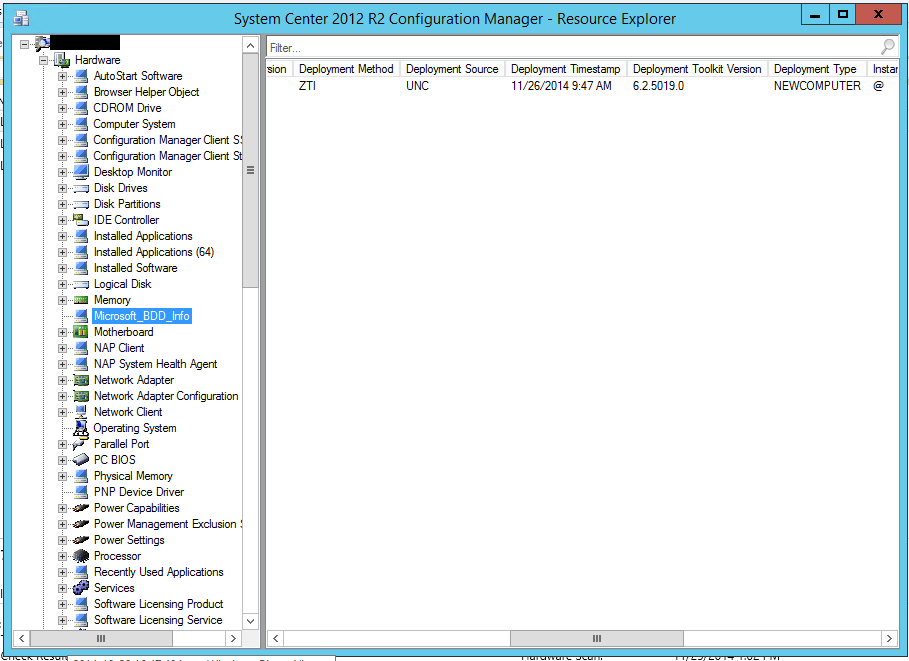
After the next hardware scan cycle, you’ll have a new Microsoft_BDD_Info section that contains the deployment timestamp and other useful information to report on.
Found this useful? You can buy me a coffee on Ko-fi.